

We offer credit and non-credit educational opportunities close to home!
At LLCC-Litchfield, you can:
- Schedule a visit.
- Complete placement testing. Placement testing is available Monday-Friday, 8:30 a.m. to 3:30 p.m. (no Friday testing during summer hours)
- Meet with your student success advisor.
- Enroll and pay for classes (transfer, occupational, College Now and adult education).
- Receive financial aid assistance.
- Receive assistance ordering textbooks online. Textbook orders may be picked up at LLCC-Litchfield with no shipping fees.
- Receive technical assistance with LoggerCentral, Canvas and email.
- Meet with an academic success professional to enhance your educational performance in the areas of: Test anxiety, study skills, note taking, time management and more! Call 217-786-3401 or email LLCC-Litchfield to schedule an appointment.
- Request one-on-one free peer tutoring, or apply to be a peer tutor.
Upcoming events
FAFSA Completion Night
LLCC-Litchfield will host a financial aid completion night Wednesday, Oct. 28, 2026. Thirty-minute appointments will be available from 4 to 6:30 p.m.
Register for FAFSA Completion Night
Work Forward Series: AI and the Human Advantage
Join us Dec. 1, 11:30 a.m. to 1 p.m., at LLCC-Litchfield for AI and the Human Advantage, the next event in the Work Forward series. AI can draft a message, summarize information or recommend a course of action in seconds. But a convincing answer still needs careful review. Does it fit your workplace? What assumptions does it make? Who could be affected? This session explores why human judgment becomes more valuable as AI takes on more tasks. We’ll discuss how to use AI to strengthen your thinking, recognize when an answer needs questioning and bring the experience, context and accountability that sound decisions require. Whether you’re already using AI or considering where it fits, join us for a practical conversation about what technology can contribute and where people make the difference. The event is free, and a light meal is included. Registration is required. Registration closes Nov. 23. To register, visit: www.llcc.edu/litchfield
Register for AI and the Human Advantage
Upcoming workshops
LLCC-Litchfield is excited to offer a variety of Professional Development Institute (PDI) and community education workshops.
Campus Visit Day at LLCC-Springfield

Come see what LLCC has to offer at our Springfield Campus Visit Day on Monday, Feb. 15, 2027.
Visit LLCC Campus Visit Day for details!

Industrial Technology
Industrial techs have the knowledge to jump in and repair or maintain high-tech machines used in factories, warehouses, hospitals and more. Attend night classes for industrial technology at LLCC-Litchfield for FREE! Classes for this Monday-Thursday, two-semester program start this fall, and students will have tuition, fees and books covered.*
*Funded by the Advanced Manufacturing Grant. Students must maintain satisfactory academic standards.
Ready to get started? Are you interested in ...
LoggerCentral
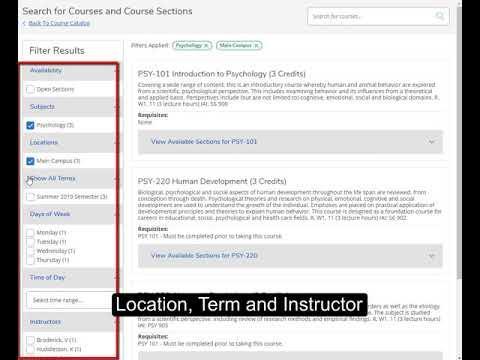
LoggerCentral provides the most up-to-date list of classes, their format, when they are offered and who is teaching them.
Watch the video to learn how to navigate LoggerCentral and search for available classes.
Register for classes
Registration is now open for eight-week classes (Mod 2) that begin Oct. 19 and spring 2027 classes.
View classes in LoggerCentral. LLCC is offering three class formats: face-to-face, online and hybrid.
Current students
Current students can register by phone (217-786-3401) or by signing in to LoggerCentral and are encouraged to meet with their student success advisor to discuss class options.
New students
New students should first fill out an application or learn more about getting started. Students may also call us at 217-786-3401.


